Wednesday, September 2, 2015

Mobile App for LIC status

Mobile App for checking LIC status, Payment of premium and other services.

For Android Users : “LIC of India Mobile App”


For Windows Users : “LIC Mobile”

Now all information about LIC products & portal services are on your fingertips.
Features:
- Options for viewing Products of LIC,
- LIC Premium calculation,
- Compare Premium,
- Pay Premium,
- Check Policy Details,
- Apply for Policy
- Customer Login - Agent Login
- LIC Branch contact information.

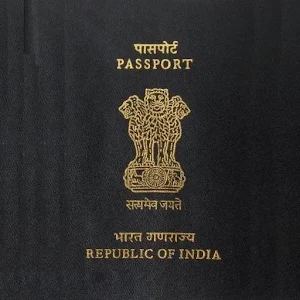
Mobile App for passport services

Mobile App for basic passport related services
Cover art
For Android Users : “mPassport Seva”


For Windows Users : “mPassport Seva”


Passport Seva Project, being executed by Consular, Passport and Visa (CPV) division of the Ministry of External Affairs (MEA), Government of India, aims at providing all the Passport-related services to the Indian Citizens in a speedy, convenient and transparent manner. This is one of the largest projects of the Government of India under the National e-Governance Plan (NeGP) being executed in public-private-partnership mode with Tata Consultancy Services (TCS) as the private partner. The project is already operational and servicing citizens through 77 Passport Seva Kendras across India.
MEA with a view to provide mobile enablement of public services, has launched a Mobile Application ‘mPassport Seva’ to offer a wide variety of services to smartphone users such as Passport application status tracking, locating the Passport Seva Kendra (PSK) and general information on various steps involved in obtaining a Passport.
More information can be obtained from the official website: www.passportindia.gov.in

Mobile App for Scanning and creating PDF

Mobile App for Scanning and creating PDF

For Android Users : “Camscanner”


For Windows Users : “Camscanner”


Promotion!! Refer friends to CamScanner, get free Premium.
The world’s No. 1 mobile document scanning and sharing app with over 100 million installs in more than 200 countries
* Over 50,000 new registrations per day
* CamScanner, 50 Best Apps, 2013 Edition – TIME
* Top Developer – Google Play Store
CamScanner helps you scan, store, sync and collaborate on various contents across smartphones, tablets and computers.
Features:
*Mobile Scanner
Use your phone camera to scan receipts, notes, invoices, whiteboard discussions, business cards, certificates, etc.
*Optimize Scan Quality
Smart cropping and auto enhancing make the texts and graphics look clear and sharp
*Quick Search
By entering any keyword, you’ll see a list of docs with the word in their titles, notes or images (Registrants only)
*Extract Texts from Image
OCR (optical character recognition) extracts texts inside single page for further editing or .txt sharing. (Licensed only)
*Share PDF/JPEG Files
Easily share docs in PDF or JPEG format with others via social media, email attachment or sending the doc link
*Print & Fax
Instantly print out docs in CamScanner with nearby printer; directly fax docs to over 30 countries right from the app
*Collaboration
Invite friends or colleagues to view and comment on your scans in a group. (Registrants only)
*Advanced Editing
Making annotations or adding customized watermark on docs are made available for you
*Secure Important Docs
Set passcode for viewing important docs; meanwhile, when sending doc link, you can set password to protect it
*Sync across Platforms
Sign up to sync documents on the go. Just sign in to any smartphone, tablet or computer (visit www.camscanner.com) you own and you can view, edit and share any document. (Registrants only)
Premium Subscription Features ($ 4.99/month or $49.99/year):
1. Edit OCR results and notes of the entire doc, exporting as .txt file
2. Create Doc Collage for multiple pages
3. Add 10G cloud space
4. Add 40 extra collaborators
5. Send doc link with password protection and expiration date
6. Auto upload docs to Box, Google Drive, Dropbox , Evernote and OneDrive
7. Batch download PDF files in web app (www.camscanner.com)
8. Every benefit registrants enjoys
9. Everything paid app offers
Please note the subscription is automatically renewed at the end of the period unless you choose to cancel the subscription.
CamScanner users scan and manage
* Bill, Invoice, Contract, Tax Roll, Business Card…
* Whiteboard, Memo, Script, Letter…
* Blackboard, Note, PPT, Book, Article…
* Credential, Certificate, Identity Documents…
3rd Party Cloud Storage Services Supported:
-Box, Google Drive, Evernote, Dropbox, OneDrive
The free version is an ad-supported version and scanned documents are generated are with watermark; Invite 10 collaborators per document at most.
We’d love to hear your feedback: asupport@intsig.com
Follow us on Twitter: @CamScanner
Like us on Facebook: CamScanner
Follow us on Google+: CamScanner

Mobile App for Share Market News

Moneycontrol Markets on Mobile

Mobile App for Share Market news, updates, listings etc.
For Android Users : “Moneycontrol  Markets on Mobile”


For Windows Users : “Moneycontrol”


The Markets on Mobile app is your gateway to all critical real-time information about Indian and global markets through your Android device. If you are an investor, trader, professional or just interested in business, economy and financial markets, you will find this to be an invaluable tool. And this application is powered by moneycontrol.com – India’s no.1 financial and business portal trusted by millions. It is now available in Hindi and Gujarati too.
Use the application to get real time stock quotes on BSE and NSE, Sensex, Nifty, and other Indian and Global market Indices, manage and keep track of your investment portfolio, watch CNBC-TV18, CNBC AWAAZ, CNBC Prime HD and CNBC Bajar Live and get in-depth coverage & analysis of financial markets, economy and business.
The application is now available to you on your Android mobile. For any queries regarding the app, mail us on feedback@moneycontrol.com
Download the app to get going. It’s fast, easy-to-use and FREE. 

Tuesday, September 1, 2015

Mobile app for Small Business Accounting

Small Business Accounting

https://play.google.com/store/apps/details?id=com.smba.offline&hl=en

Small Business Accounting is a simple and easy financial app for small and medium businesses, specifically customized for India.
It keeps track of all your customer information and records all the money-in transactions. All the data is stored on the device and is always available. 
This is a FREE app with no limits on the usage.
Key Features:
• Store all the customer information in 1 place.
• Get complete information about a customer when they call.
• Import contact details from the Phone’s contact list.
• Create unlimited Estimates , Invoices and Sales Receipt on the go.
• Receive payment for invoices.
• Handle VAT and Service Taxes as per Indian rules.
• Easily track all customer transactions at one place.
• Send Email or SMS to customers directly from the App.

Mobile App for basic accounting

Mobile App for basic accounting on mobile

For Android Users : A. “Book Keeper Accounting+Invoice”


Book Keeper Accounting is a financial/business accounting app for small and medium businesses. It’s simple user interface allows you to send invoices & estimates, track expenses & receipts, manage inventory, view & send various financial reports and much more. It's a complete accounting package which helps you maintain your company books and do all financial accounting.
Try the app FREE for 30 days, after which you can opt for yearly subscription (starting $50/year or INR 2000/year) or one time purchase plan (starting $200 or INR 7500)
• Unlimited features: Create unlimited accounts, inventory, companies, transactions. No limit!!
• Invoicing: Invoices for products and services; Customize invoice fields like quantity, rate, amount in words, shipping details; Add company logo to invoices; Sign your invoices; Email invoice PDF or take prints; Track paid & outstanding invoices
• Estimates: Create and send estimates to your customers, convert them to invoices later
• Expenses/Receipts: Enter business expenses; payments made; income earned; analyse profits earned
• Inventory Management: Manage your entire inventory
• Financial reports: In depth analysis of your business with 15 comprehensive reports
• No Internet connection required: Offline accounting app, manage accounts on the go
• Stand-alone app: Maintain financial accounting books, no dependency on other software, no sign up required
• No prior accounting know-how: Maintain accounting books with ease, no accounting/bookkeeping knowledge required
• Online Sync: Sync your company data across multiple devices via Dropbox. All data entered on one device gets reflected on other device at the same time!!

Book Keeper Accounting is Tally™ compatible. Sync your company accounts with Tally™ by importing existing Tally™ Masters into Book Keeper, and exporting Masters and Transactions from Book Keeper to Tally™
It is based on professional accounting principles to ensure balanced books and accurate reports.
Just enter your daily vouchers and let Book Keeper does all the double-entry accounting.

Accounting
• Easy, real accounting
• Accountant approved
• Maintain individual ledgers/accounts
• Automatic computation of profit/loss
• Reconcile bank statements

Transactions
• Create sales, purchase, receipts, payments, banking transactions (single-entry & double-entry mode)
• Generate invoices and mail them to customers
• Send estimates & convert them to invoices
• Enter tax vouchers, view tax computation
• Keep track of paid/unpaid invoice, outstanding receivable/payable with aging analysis

Order generation
• Generate sales order/estimates, issue purchase order

Inventory Management
• Create individual inventory items with your own units of measure.
• Record purchase/sale/purchase return/sales return voucher entries of these items.
• Record manufacturing journals.
• Automatic valuation of closing inventory based on Average Cost (AVCO) Method.

Reports
• View various financial accounting reports (Trial Balance, P&L A/C, Trading A/C, Balance Sheet etc.) which are automatically generated
• View detailed reports of each inventory item
• View summary of all inventory item

Permissions explained:
Storage: For storing company backups and reports (in PDF, CSV, HTML format) on your SD card.
Network Communication: For interacting with our servers when you login with your email ID (with which you purchased the subscription).
Contact Information: For fetching contacts while creating an account.
Phone Status & Identity: For linking your email ID (with which you purchased the subscription) with your unique device ID.
Call/SMS Phone Number: For calling or sending SMS to customers/suppliers

Mobile App for Companies Act,2013

 Mobile App for complete details on Companies Act,2013

For Android Users : “Companies Act,2013”

Click to Download


Entire text of the Indian Companies Act, 2013 in a user friendly readable and searchable format.
The Act is divided into Chapters, Parts and Sections as originally provided in the Companies Act, 2013. It consists of all the Sections of the Companies Act, 2013 which any user can read and can search any text or sections. The best part is that the text can be shared through the sharing option. Very useful application for professionals as well as students.
1. Complete Provisions containing all the Sections of the Companies Act, 2013.
2. Divided into Chapters, Parts and Section List.
3. Searchable (Search Key Available) Search by Section Content or Section Title
4. Display's Current Path in every Screen and in every Section so that you know where you are.
5. Navigate Indexes by Trackball/D-Pad
6. Completely Scrollable
7. Tablet Screens Supported
8. Text size can be increased/Decreased for Section Content.
9. Various themes to suit your reading
10.Various font sizes to help in reading 
11.Share Section Title, Content or both through SMS, Email or any text related application.

*Disclaimer: We assume absolutely no responsibility of whatsoever nature for the content of this application.
Key Words: Companies Act 2013, Company Law, Corporate Law, Director, Shareholder, Legal, Company Secretary, Chartered Accountant, Lawyer, MCA

Automatic Call Recording

 Mobile App for Automatic  Call Recording

For Android Users : “Automatic Call Recorder”

Download

Record any phone call you want and choose which calls you want to save. You can set which calls are recorded and which are ignored. Listen to the recording, add notes and share it. Integration with Google Drive™ and Dropbox allows calls to be saved and synchronized to the cloud as well. 
Google Drive integration works on Android versions 3.0 and above.
Please note that call recording does not work on certain handsets and can result in inferior quality recordings. We therefore suggest that you try the free version before purchasing the paid app.
If you encounter any recording issues or wish to improve voice quality, try recording from a different audio source, or use auto-on speaker mode.
Recorded calls are stored in the Inbox. You can change the destination recordings folder to an external SD card as well. You can set the size of the inbox. The number of saved calls is limited only by your device memory. If you decide that a conversation is important, save it and it will be stored in the Saved Calls folder. If not, old recordings will automatically be deleted when new calls fill up the inbox.
You can enable a Call Summary Menu with options to appear immediately after a call.
Search for recordings by contact, phone number, or note.

There are 3 default settings for automatic recording:
Record everything (default) – This setting records all calls except for contacts pre-selected to be ignored.
Ignore everything – This setting records no calls except for contacts pre-selected to be recorded.
Ignore contacts – This setting records all calls with people who are not contacts, except for contacts pre-selected to be recorded.
In the Pro version only: You can set calls from particular contacts to be automatically saved, and they will be saved in the cloud.
This app contains ads.

Saturday, August 15, 2015

Prime Minister Address to the Nation on 15 aug 2015


Prime Minister Address to the Nation 
 Red Fort at 69th Independence Day on 15 th Aug 2015


Friday, July 24, 2015

Tata Safari Storme

Tata Safari Storme facelift launched at Rs. 9.99 lakh

Image result for Tata Safari StormeImage result for Tata Safari Storme
Tata has quietly launched the Safari Storme facelift in India. The Safari Storme facelift gets minor exterior changes, major additions to the interior in terms of design and features, an improved engine, and reduced prices.
“As India’s first SUV – the Tata Safari has constantly evolved catering to varied requirements of the Indian car buyer, inspiring them to not only think big, but to also think adventure with their families. The new Safari Storme launched today is based on Tata Motors HORIZONEXT, having evolved for a more engaging and connected drive, boasting added masculinity, with increased power. The new Safari Storme has a host of integrated connectivity features for a more complete vehicle experience, new design elements to the exteriors and the interiors, for added dynamism, boldness and aggression, along with a superior road presence,” said Girish Wagh, Senior Vice President, PPPM (Program, Planning and Project Management), Passenger Vehicles Business Unit, Tata Motors.
Tata Safari Storme facelift Right Side Profile DynamicTata Safari Storme facelift Rear Left Quarter  Tata Safari Storme facelift Headlamp and Fog Lamp
Tata Safari Storme facelift Headlamp and Fog Lamp Tata Safari Storme facelift Grille and Badge Tata Safari Storme facelift Alloy Wheels
 Tata Safari Storme facelift Tail-lamp Tata Safari Storme facelift Spoiler Tata Safari Storme facelift Exhaust
The exterior design has been given a subtle upgrade on the Safari Storme facelift. These include new honey-comb like grille and air-dam design, as compared to the slanted-slat like grille of the older model. The new grille is also available with either in Charcoal Grey or Ocean Grey colour depending on the variant. The ‘Storme’ badging on the front silver cladding is now embossed in black rather than in silver, which is more legible and not as gaudy. The roof rails have also been subtly re-designed.
Inside, the Storme receives lots of changes, this has been done after receiving a lot of criticism from reviewers and customers alike. The beige-and-wood theme has been replaced with classier looking black-and-silver theme, the seat fabrics are also dark-grey to complement the new cabin theme. The centre console and the steering wheel receive major design changes.
The steering wheel is now smaller and is a three-spoke unit similar in look to the ones found on the Zest compact-sedan and the Bolt hatchback. This unit will be a common theme across the newer Tata models, though it may not fit the Safari’s butch exterior look. The new steering wheel gets multimedia and telephony controls which were not available on the pre-facelift model.
Tata Safari Storme facelift Steering Wheel Tata Safari Storme facelift Instrument clsuter Tata Safari Storme facelift Front Centre AC Vents
Tata Safari Storme facelift Centre Console In-Focus Tata Safari Storme facelift AC Controls Tata Safari Storme facelift 4WD Selector
The centre console and horizontal slabs on both sides of it are now painted silver. This complements the black plastic on the upper-, lower-dashboard and around the cabin. The air-con unit and a new Connectnext multimedia system by Harman are surrounded by a chrome strip and are very well integrated into the centre console unlike the previous model.
The analogue clock placed in-between central A/C vents on the centre-console has been removed, the slot for the clock remains though and it looks very odd.
New equipment on the Tata Safari Storme include the multi-function steering wheel, the new Harman multimedia system and the addition of reverse parking sensors. The Harman developed multimedia system is nicely integrated onto the centre console, is MP3/AUX/USB/Bluetooth compatible and also offers Bluetooth telephony. The steering wheel gets controls for the multimedia system and Bluetooth telephony. The reverse parking sensors are a great boon and the display is integrated onto the multimedia display screen. No other new features have been added to the Safari Storme.
Engine and transmission
The Tata Safari Storme is still powered by the 2.2-litre, in-line 4-cylinder, turbocharged diesel engine. Tata engineers have been able to tweak the engine, it now delivers a maximum power of 150 PS @ 4000 rpm (gain of 10PS), the maximum torque delivered remains the same at 320 Nm @ 1700-2700 rpm. The engine is connected to a 5-speed manual transmission, there are reports which suggest that an automatic transmission will be offered soon. A self-adjusting clutch is also being offered for the first time on the Storme, the company claims that this will reduce the effort required to operate it.
The Tata Safari Storme is now more efficient, with a ARAI-attested figure of 14.1 km/l which is an improvement of 0.1 km/l. The Storme gets a larger 63-litre thank as compared to the 55-litre unit on the older model.
The VX 4×4 variant of the Tata Safari Storme gets a on-the-fly operable electronic AWD system with a 4WD low setting as well.
rices
The Tata Safari Storme is available in 4 variants, in which one offers a AWD drivetrain. Prices, ex-shworoom Delhi are as follows:
Safari Storme LX 4×2 : Rs. 9.99 lakh
Safari Storme EX 4×2 : Rs. 11.61 lakh
Safari Storme VX 4×2 : Rs. 13.02 lakh
Safari Storme VX 4×4 : Rs. 14.35 lakh
Tata has reduced the price of the base LX variant by about Rs. 42,000 by removing some features such as ABS, side- and rear-footsteps, front fog lamps, etc. The prices for the rest of the variants remain unchanged.
The VX trim gets reverse parking sensors at no extra cost while the EX and VX trim get the new multimedia system at no extra cost.


Tuesday, January 20, 2015

Audit Risk Model ;Inherent Risk, Control Risk , Detection Risk

In this Video we will see the relationship of Audit Risk with Inherent Risk, Control Risk and Detection Risk

Audit Risk = Function of ( Inherent Risk, Control Risk , Detection Risk)

AR= IR* CR* DR

DR= AR/ IR* CR

Thus Detection risk moves in Opposite Direction to Inherent Risk and Control RisK

Means

Lower the Inherent Risk and Control Risk Higher the Detection risk 

Higher the Inherent Risk and Control Risk Lower the Detection risk 

What is Risk and Risk Management in Software Projects?

In this video, let us first understand what is risk. Then let us see the steps of the risk management process:

- Risk identification (identify the risks)
- Risk prioritization (provide rating of probability and impact to each risk)
- Risk treatment (decide to avoid risk, transfer risk, accept risk or mitigate risk)


What is test data and what are its types?

What is test data and what are the types of test data

This testing training tutorial video explains test data in software testing, test data types, test data management and test data generation for testers in software testing.

Input test data for login example should be:
1) No username and no password
2) Username but no password
3) No username but a password
4) Both username and password


Thursday, January 15, 2015

Excel Baby Steps. : 10 Things one minute each

10 things you can do in Excel under one minute each. 

You can learn how to;

1. Auto sum a bunch of values
2. Save Excel file as PDF
3. Insert Org chart
4. Insert Euro Symbol
5. Change Tab Colors
6. Insert clickable buttons that take user to other sheets
7. Paste Excel Data / Tables / Charts to PPT
8. Use Format Painter to Speed up Formatting
9. Create Splits & Freeze Panes
10. Hide Unused Rows & Columns

Monday, January 12, 2015

Microsoft Excel: 10 Tips to make Data Entry faster

10 top tips to make Data Entry faster and more accurate in Excel.

Video Highlights:

--- Simple Data Entry ---
0:25 - Data Entry using Tab and Enter

1:00 - Fill down from above using CTRL + D
1:30 - Autocomplete using Tab key
2:10 - Show drop down list using ALT + Down arrow
4:15 - Enter values into multiiple cells using CTRL + Enter

--- Excel Can Speak ---
5:19 - Get Excel to speak to you when you enter data!

--- Data Entry Form ---
7:02 - Show the data entry form

--- Keep Headers Visible ---
9:20 - Freeze Panes (ALT ➜ W ➜ F ➜ F)
10:20 - Split Window (ALT ➜ W ➜ S)
11:14 - Use Excel Table (CTRL + T to add table)